git & ntfy
Tracking third-party content changes with git scraping and ntfy.sh
· 3 min read
Scrape & Notify #
Tracking third-party content changes is one of those problems that seems simple until you actually try to do it. Sure, there are fancy tools that’ll snapshot static pages and alert you on diffs, or monitor REST API responses with scheduled cron jobs, but when you’re dealing with datasets that don’t have change tracking built in, you’re stuck manually comparing files or writing your own diff tooling.
For this mini project, I had three goals: track changes to the content I was interested in, self-host a notifications tool, and keep it all free.
Git tracking #
I stumbled across Simon Willison’s post on git scraping while wrestling with a problem that felt like it should be simpler than it was. I’d built a tool that synced content to a third-party data store. The logic was straightforward: hash incoming content, compare against the last uploaded hash, and only overwrite if something changed. Simple, right?
Except the provider didn’t give me a way to retrieve the previously uploaded hash. So I needed somewhere to stash that state. S3? Postgres? Redis? Supabase? Kubernetes CLUSTER?! (jk) Just write it to disk? All perfectly valid options, but remember, I wanted to keep this project free and not introduce a service I’d only use for this exploration.
Simon’s post does a great job explaining the git scraping pattern. You commit changes to a repo, and you have a complete change history with git’s diff capabilities. No extra infrastructure, no additional moving parts. It’s elegant.
ntfy.sh #
Git solved the tracking problem, but I wanted to know when and what changed without manually checking the repo. GitHub’s watch feature works at the repository level, which is too broad.

GitHub Watch
I actually ended up turning off most notifications in GitHub because I was getting so much stuff.
I found github-file-watcher.com which does exactly what I wanted -> watches specific files in public repos, but I’m working with a private repository, so that was a dead end.
What I really wanted was this: ping me with the exact payload diff whenever tracked content changed.
While scrolling through r/selfhosted one night, I came across ntfy.sh, a notification service that looked pretty straightforward and could be self-hosted. Perfect excuse to give it a try.
Pulling it all together #
After installing ntfy.sh and wiring it up to my ingress, I set up a GitHub Actions workflow that fetches the latest payload, compares it against the previous version stored in the repo, and sends me a notification if anything changed.
name: Scrape latest data

on:
  push:
  workflow_dispatch:
  schedule:
    - cron:  '0 1,3,6,12,18 * * *'

jobs:
  scheduled:
    runs-on: ubuntu-latest
    steps:
    - name: Check out repository
      uses: actions/checkout@v4

    - name: Fetch latest payload
      run: |
        curl -o new.json https://<sample-url>

    - name: Check for changes
      id: check
      run: |
        if [ -f old.json ]; then
          OLD_SHA=$(sha256sum old.json | cut -d' ' -f1)
          NEW_SHA=$(sha256sum new.json | cut -d' ' -f1)
          if [ "$OLD_SHA" != "$NEW_SHA" ]; then
            echo "changed=true" >> $GITHUB_OUTPUT
          else
            echo "changed=false" >> $GITHUB_OUTPUT
          fi
        else
          echo "changed=true" >> $GITHUB_OUTPUT
        fi

    - name: Send notification if changed
      if: steps.check.outputs.changed == 'true'
      run: |
        DIFF=$(diff -u old.json new.json || true)
        curl -H "Markdown: yes" \
             -d $'```diff\n'"$DIFF"$'\n```' \
             https://<self-hosted-url>/<topic>

    - name: Commit and push changes
      if: steps.check.outputs.changed == 'true'
      run: |
        git config user.name "Automated"
        git config user.email "actions@users.noreply.github.com"
        mv new.json old.json
        git add old.json
        timestamp=$(date -u)
        git commit -m "Update data: ${timestamp}" || exit 0
git pushPretty cool! now whenever there are any changes to the content I’m watching, I get a push notification and can see the markdown diff right in the notification event history:
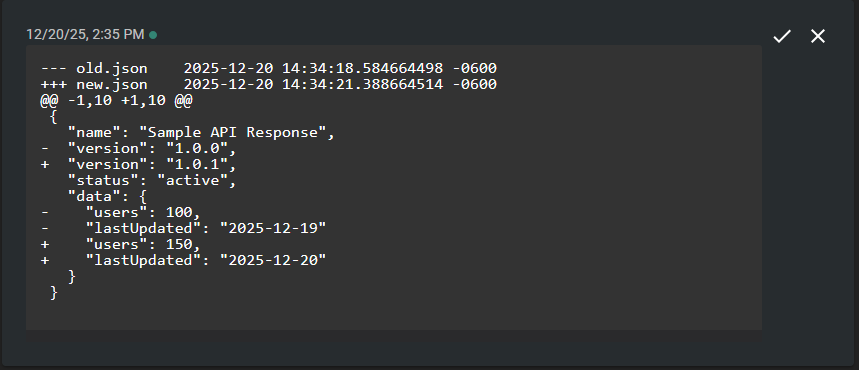
Notifications History
Mission accomplished: Git Scraping, Free, Self-hosted.